

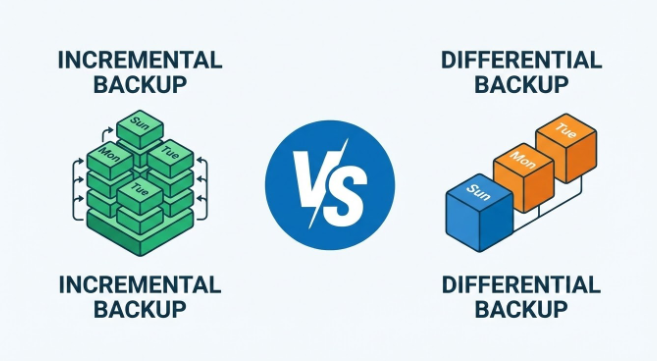
Your backup strategy is only as good as your worst-case scenario. While most IT professionals will install a default, run-of-the-mill backup as they’ve been taught, it’s less often tested against worst-case scenarios. For example, what if you need to restore a corrupt database at 2 AM for a business-critical function? This is the key point, and where the choice between incremental and differential strategies comes into focus.
| Feature | Incremental Backup | Differential Backup |
|---|---|---|
| Backup Size | Small | Medium |
| Backup Speed | Fast | Moderate |
| Restore Time | Slow | Faster |
| Storage Usage | Least | More |
A full backup is exactly what it sounds like: a complete copy of all the data you have selected. Every file, every folder, basically every piece of information and data on your systems. This serves as the basis for both backup plan types to work from.
Neither incremental nor differential backups work in isolation, as they both need a full backup to function. In essence, both utilize the full backup as a base to compare against and then build a backup layer weekly/daily/hourly on top of this. The NIST Contingency Planning Guide recommends different factors for each of the two backup strategies.
An incremental backup captures only the data that has changed since the last backup. This might be the full backup or the last incremental.
After your initial full backup on Sunday, Monday’s incremental backup only captures Monday’s changes. Tuesday’s incremental then captures only what changed since Monday. So, if the full backup is 100 TB, and your environment has a typical daily change rate of around 1–5%, depending on workload, each incremental range is 1-10 TB. This pattern continues until the next full backup, keeping each individual backup small and fast.
Speed is the big win here. Incremental backups finish quickly because they’re handling minimal data. Storage requirements stay lean, and network bandwidth barely notices the load.
Restoration is where things get complicated. To recover your data, you need the full backup plus every single incremental backup in sequence. If Tuesday’s backup gets corrupted, you’d be stuck at Monday’s data state. This can be an issue when there is large-scale data corruption.
A differential backup captures all data that has changed since the last full backup, regardless of how many differential backups you’ve run since then.
Using the same Sunday full backup example, Monday’s differential captures Monday’s changes. Tuesday’s differential captures both Monday’s and Tuesday’s changes. Wednesday captures Monday through Wednesday. Each differential slice is larger than its incremental equivalent, and the size grows cumulatively until the next full backup.
You only need two pieces for any differential backup recovery: the last full backup and the latest differential one. That’s much less to reassemble and put together than an incremental needs.
Those backup files get bulky. By Friday, you’re copying nearly a week’s worth of changes, which takes longer and consumes more storage than an equivalent incremental approach.
Modern backup solutions from vendors like Veeam, Commvault, and Cohesity offer an additional layer of solution, synthetic full backups. This process reconstructs the full backup from an incremental chain and doesn’t need to reread the full source data. You get the restore simplicity level of a full backup, but don’t need to run a full one itself.
The fundamental distinction comes down to reference points. Incremental backups look at what changed since any previous backup. Differential backups always reference the original full backup. Essentially, it’s a trade-off of efficiency and simplicity.
Also to note: deduplication and compression can narrow the gap between these approaches. Deduplication identifies redundant data blocks across backups and stores only unique blocks, meaning the theoretical storage differences aren’t as big as the numbers suggest.
Feature |
Incremental |
Differential |
| Backup Speed | Fastest | Moderate |
| Storage Required | Lowest | Grows over time |
| Restore Speed | Slowest | Faster |
| Restore Complexity | High (requires chain) | Low (two components) |
| Risk of Data Loss | Higher | Lower |
Incremental backups work best when:
Cloud-based backup solutions often default to incremental approaches for these reasons. According to TechTarget’s backup guide, incremental backups are generally better in cloud environments as they are less resource intensive and more cost effective.
Differential backups are better when quick recovery time is non-negotiable and when your data change rate is moderate. Systems where downtime costs thousands per minute are much better candidates for differential backups.
Differential backups typically offer faster RTO (Recovery Time Objective) for disaster recovery.. However, a well-managed incremental backup system with proper monitoring and regular testing can still work, as these systems are improving.
One option that is common in organizations is to run weekly full backups with daily differentials, then use hourly incrementals. This blends the best of both worlds for close, hourly recovery while avoiding data charges getting out of control.
Your organization runs a Sunday full backup and daily incrementals. Ransomware hits Thursday night and encrypts your data. To restore to Thursday’s clean state, your team needs:
That’s five backup sets to sequence correctly — at 2 AM. If any one set is corrupted or missing, you lose everything since the last intact backup.
Incremental backups capture changes since any backup, while differential backups capture all changes since the last full backup.
Incremental backups are faster because they copy less data.
Incremental backups require less total storage space.
Differential backups restore faster since you only need two backup sets.
Yes. Many backup strategies combine both methods, often differential for larger sizes and incremental for smaller and more fine-grained.
There’s no single right answer — it’s a tradeoff between storage cost, recovery speed, and operational complexity. The most important step is stress-testing your backup plan against your actual worst-case scenario before that scenario happens.
Ask yourself:
If you’re running critical systems for a Canadian business — in finance, law, construction, or any regulated industry — the cost of a slow recovery almost always outweighs the savings from a leaner incremental approach. Differential or hybrid strategies tend to be the right default.
If you’d like a backup assessment tailored to your environment, our team at Tecbound can evaluate your current setup and recommend a strategy built around your specific RTO, RPO, and compliance requirements.
Get A FREE Subscription To Weekly Cybersecurity Tips So Your Company Doesn’t Become The Next Victim.